
Published:
·
updated
15 min read
An honest answer to whether Notion is still worth it in 2026: what each plan really costs, where AI earns its price, where Notion falls short, and a 30-minute test to decide.

The version of the question “is notion still worth it?” that I hear most often is not really about Notion being good or not. Every single person who asked me actually meant “Will I actually keep using Notion after I spend a couple of days building my workspace inside it?”
Let’s be clear: Notion can hold your notes, tasks, projects, client records, forms, meeting notes, internal documentation, and lightweight automations. It can also tempt you into creating a beautiful operating system with fancy dashboards that take more time to maintain than the actual work done inside. Both experiences are real.
So let me give you my short answer: Notion is still worth it in 2026 if you need flexible information and workflows in one connected workspace. It is especially strong for individuals, consultants, content teams, startups, and SMBs that want documents and databases to live together. It is less convincing if you only need a fast to-do list, advanced spreadsheet analysis, a mature sales CRM, or rigid project management with no setup.
Notion is now more than the “note-taking app” it used to be. We have now: offline pages, forms, charts, calendar tools, dashboards, AI meeting notes, Enterprise search, granular database permissions, AI agents, and automations that have closed multiple gaps that once forced users into extra apps. But “more” does not mean “best at everything.” The value still depends on whether you use Notion as a focused system or as an endless building project.
This guide gives you the decision I would make for each type of user, what the plans actually cost, where the product is genuinely better in 2026, where it still falls short, and a simple test to decide whether it deserves a place in your workflow.
Is Notion still worth it in 2026?
Yes, for the right job.
Notion is worth it when the same work needs both context and organization. A normal document gives you context but weak structure. A spreadsheet gives you organization and structure but weak documentation. A dedicated task manager gives you deadlines but not the full decision history. Notion allows a project record to contain properties, tasks, notes, files, decisions, and linked meetings in the same place.
That is the real advantage of using Notion. It is not that Notion has pages or databases. Many tools have both. It is that a database row is also a full page, and the same information can appear as a table, board, calendar, timeline, list, chart, form response, or filtered dashboard without being copied and pasted from one place to another.
Notion is probably worth it if three or more of these statements are true:
You keep the same project information across documents, spreadsheets, and task apps.
You repeat the same process for clients, content, hiring, projects, or meetings.
You want one source of truth with different views for different people.
You need notes and structured records to stay connected.
You want to build a workflow around your process instead of adapting to a rigid tool.
Your team loses decisions and context because they live in chat or meeting transcripts.
You can name one recurring manual process that an automation or agent could remove.
You use AI tools everyday and your projects and progress is lost within isolated chat conversations.
It is probably not worth it if your main requirement is “open the app and start checking off tasks.” A simpler tool like Apple Notes will give you less flexibility but faster adoption.
What has changed enough to make Notion more valuable now?
A few years ago, Notion was excellent for connected docs and databases, but users still needed separate tools for forms, calendars, reporting, offline access, and serious AI use. That criticism is wrong now.
Offline work is finally practical
Notion users can download individual pages and view, edit, or create content offline in the desktop and mobile apps. But there are still limits: offline access is device-specific, downloading a database automatically includes only its first 50 rows, for additional rows, you have to individually download them for offline use. Subpages may need to be marked separately, and live elements such as embeds, forms, and buttons do not work without a connection.
That means offline mode is good enough for writing, reviewing project pages, and updating core records on a flight or commute. It is not yet the same as carrying a complete local copy of a complex workspace.
Forms, charts, and calendar views reduce extra subscriptions
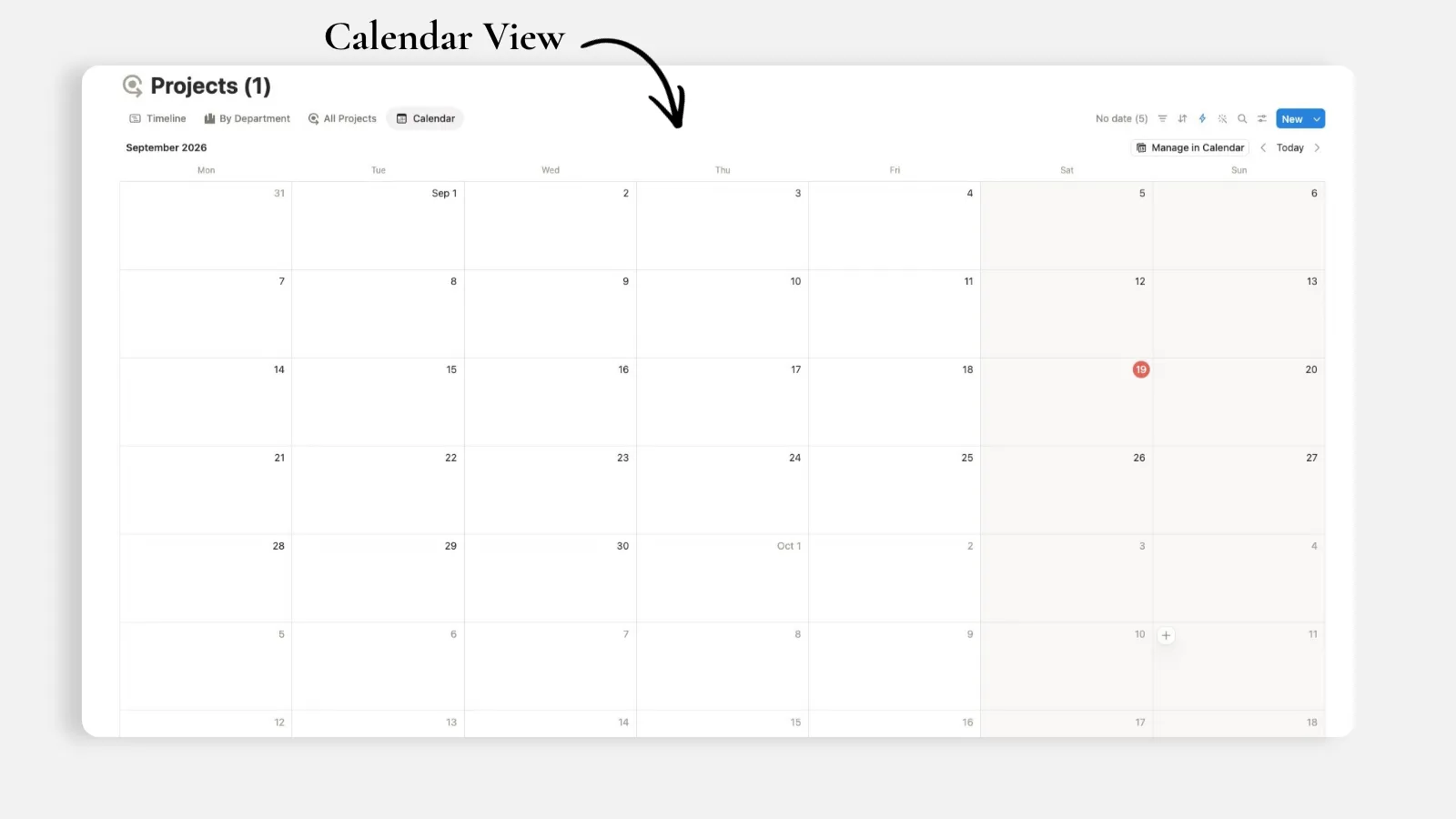
The Free plan includes basic forms, basic sites, one chart, Notion Calendar, and databases with subtasks, dependencies, and custom properties. Plus adds custom forms and sites, unlimited charts, unlimited collaborative blocks, and unlimited file uploads.
For a small or medium business, that can replace a basic form tool, a lightweight reporting dashboard, a simple public resource site, and part of a calendar workflow. The savings only count if the built-in version is good enough. If you need advanced survey logic, deep business intelligence, or complex scheduling, a dedicated app may still win.
Notion AI is attached to the workspace
The useful part of Notion AI is not generic writing. You can get generic writing anywhere. Its advantage is built-in context: meeting notes, database records, pages, connected apps, and the relationships between them.
On Business, Notion includes the Personal & Custom AI Agent, AI Meeting Notes, enterprise search, and granular database permissions. Notion’s AI tools can search workspace and connected sources, transcribe meetings, extract decisions and action items, draft research from workspace and web context, and autofill database properties.
Custom Agents extend that idea to recurring work, but they introduce usage-based Notion credits. The current public pricing lists Custom Agents as free to try, then $10 per 1,000 monthly Notion credits. That can be valuable when an agent replaces a real manual process. It is poor value when it only generates text you could produce with a normal AI chat.
My rule is simple: build the structure first, then apply AI to work that already repeats. AI inside a disorganized workspace produces faster disorganization, nothing more.
How much does Notion cost, and which plan is worth paying for?
Notion currently lists Free at $0, Plus at $12 per member per month, Business at $24 per member per month, and Enterprise at custom pricing. Annual billing will reduce the effective cost, so check the live pricing page before purchasing.
Plan | Best for | What makes it worth considering |
Free | Individuals testing a system | Unlimited use for individuals, basic databases and forms, basic sites, Notion Calendar, one chart, 10 external guests, 7-day page history, 5 MB file uploads |
Plus | Professionals and small teams | Unlimited guests, unlimited file uploads, unlimited charts and collaborative blocks, custom forms and sites, 30-day history, database automations |
Business | Teams that need AI and tighter access | Notion Agent, AI Meeting Notes, enterprise search, granular database permissions, private teamspaces, 90-day history |
Enterprise | Larger organizations with advanced governance | Custom security, administration, retention, and enterprise controls |
Is Notion Free plan worth it?
For one person, often yes. It is enough to build a task system, content calendar, knowledge base, reading tracker, simple CRM, or personal planner and learn whether the product fits before paying.
The Free plan becomes restrictive when you need multiple members, need larger uploads, want more than 10 guests, need longer version history, or want custom forms, unlimited charts, and database automations or even advanced page-level permissions. Notion’s pricing page also states that pages and blocks are unlimited for individuals but limited for workspaces with two or more members on Free (1000 blocks limit when you add a second member to your Free workspace).
Is Notion Plus plan worth it?
Plus is usually the sensible paid plan for a solo consultant, creator, or small team that already relies on Notion. Unlimited guests matter if you collaborate with clients or contractors, and unlimited uploads, charts, custom forms, and database automations remove practical friction.
Upgrade when a Free-plan limit interrupts real work.
Is Notion Business plan worth it?
Notion Business plan is worth it when at least one of these creates measurable value:
AI Meeting Notes replace manual transcription and follow-up.
Enterprise search saves the team from hunting across Notion and connected tools.
Granular database permissions protect client, employee, or departmental records.
Private teamspaces and stronger controls are required for internal operations.
The Agent and research tools are used frequently enough to replace separate AI workflows.
Advanced security and data privacy and control requirements.
If you are paying for Business only to rewrite paragraphs occasionally, it is expensive. If the team uses meeting notes, AI, enterprise search, database permissions, and agents every week, the cost is easier to defend.
What are Notion’s biggest advantages?
As someone using Notion heavily, everyday, I can’t begin to count its advantages, but let me focus on the ones that my clients love:
One connected system can replace several disconnected tools
A client database can relate to projects. Projects can relate to tasks and meetings. Meeting actions can become tasks. A dashboard can show only the records relevant to one person, client, or week. The information remains in one source instead of being copied into several trackers.
That is where Notion earns its place. The more often information needs to move between notes and structured work, the more valuable Notion becomes.
Notion adapts to the way you work
Most software decides the workflow for you. Notion gives you building blocks: pages, properties, relations, views, formulas, buttons, forms, automations, and agents. You can build a lightweight system rather than accepting a complex one.
The downside is the same feature. Flexibility creates decisions, and decisions create setup work. A blank workspace feels powerful to an experienced builder and vague to a beginner.
Database Views make the same data useful to different people
One task database can support:
A personal “My tasks this week” list.
A manager’s board grouped by status.
A founder’s timeline of active projects.
A client-facing filtered view.
A chart showing completed work.
You don’t have to create five task lists. You just create five windows into the same data source. This is the difference between a scalable system and a collection of dashboards that don’t talk to each other.
Documentation lives on the same infrastructure as daily work
A project page can hold the brief, decisions, reference files, meeting history, progress, and related tasks. That makes Notion especially strong for work where context matters: consulting, content production, operations, product development, research, and internal knowledge management.
What are Notion’s biggest drawbacks?
It is easy to overbuild
Notion’s most common failure mode is not a missing feature. It is too much flexibility.
Users create twelve databases, forty properties, nested dashboards, decorative widgets, and a task-entry process nobody follows. The workspace becomes extra job. If adding a normal task requires opening a template and filling ten fields, the system is already lost.
My standard is simple: start with one real workflow, use the fewest properties needed to run it, and add complexity only after real data exposes a problem or a real need.
Dedicated tools are deeper
Notion can act as a lightweight CRM, project manager, spreadsheet, form builder, website, and knowledge base. It is not automatically the best version of any of them.
Choose a dedicated tool when the workflow is specialized and central to the business:
A mature sales team may need forecasting, sequences, call logging, and pipeline controls from a real CRM software.
Finance teams need spreadsheet modeling and accounting systems.
Engineering teams may need issue tracking, release management, and repository integrations built around software delivery.
Complex portfolio planning may require stronger resource and dependency management.
Notion is best as the connected operating layer around these tools, not as a forced replacement for every specialist app.
Performance and navigation can degrade in complex workspaces
Large databases, heavy pages, too many embedded views, and unclear top-level structure can make a workspace feel slow and hard to navigate. The fix is rarely another dashboard: audit your workspace, archive old records, simplify views, don’t force the system to open large databases when you only need a subset of the data, and give each role one obvious landing page.
Offline mode still needs preparation
Offline support is a major improvement, but it is not perfect (yet). Pages may need to be downloaded per device, database downloads include only the first 50 rows automatically, and connected elements do not function offline. If uninterrupted local access to every file and record is critical, test the exact workflow before committing.
Is Notion worth it for personal use?
Yes, if you need more than a to-do list.
Notion is strong for personal systems that mix reference material with recurring organization: a life planner, study hub, reading library, content calendar, travel planner, goal tracker, or portfolio of ongoing projects. The Free plan is usually enough to build and run these systems.
It is not the best choice if your whole need is fast task capture and reminders. A dedicated task app will usually open faster, require fewer decisions, and handle recurring reminders more naturally.
A good personal Notion setup should have one home page, one tasks database, and only the additional databases you genuinely revisit. If you are maintaining more trackers than completing work, simplify it.
Is Notion worth it for solo operators and consultants?
This is one of the strongest use cases.
A solo operator can connect leads, clients, projects, tasks, meetings, deliverables, and invoices without buying a full enterprise stack. Plus is often the point where the setup becomes commercially useful because it adds unlimited guests, file uploads, charts, custom forms, and database automations.
The structure I recommend is small:
One Clients database.
One Projects database related to clients.
One Tasks database related to projects.
One Meetings database related to clients and projects.
A private dashboard for you and a carefully shared client portal page for each client.
Do not create a separate workspace or separate master database for every client. Keep the source of truth internal and share only what the client needs.
Is Notion worth it for teams and small businesses?
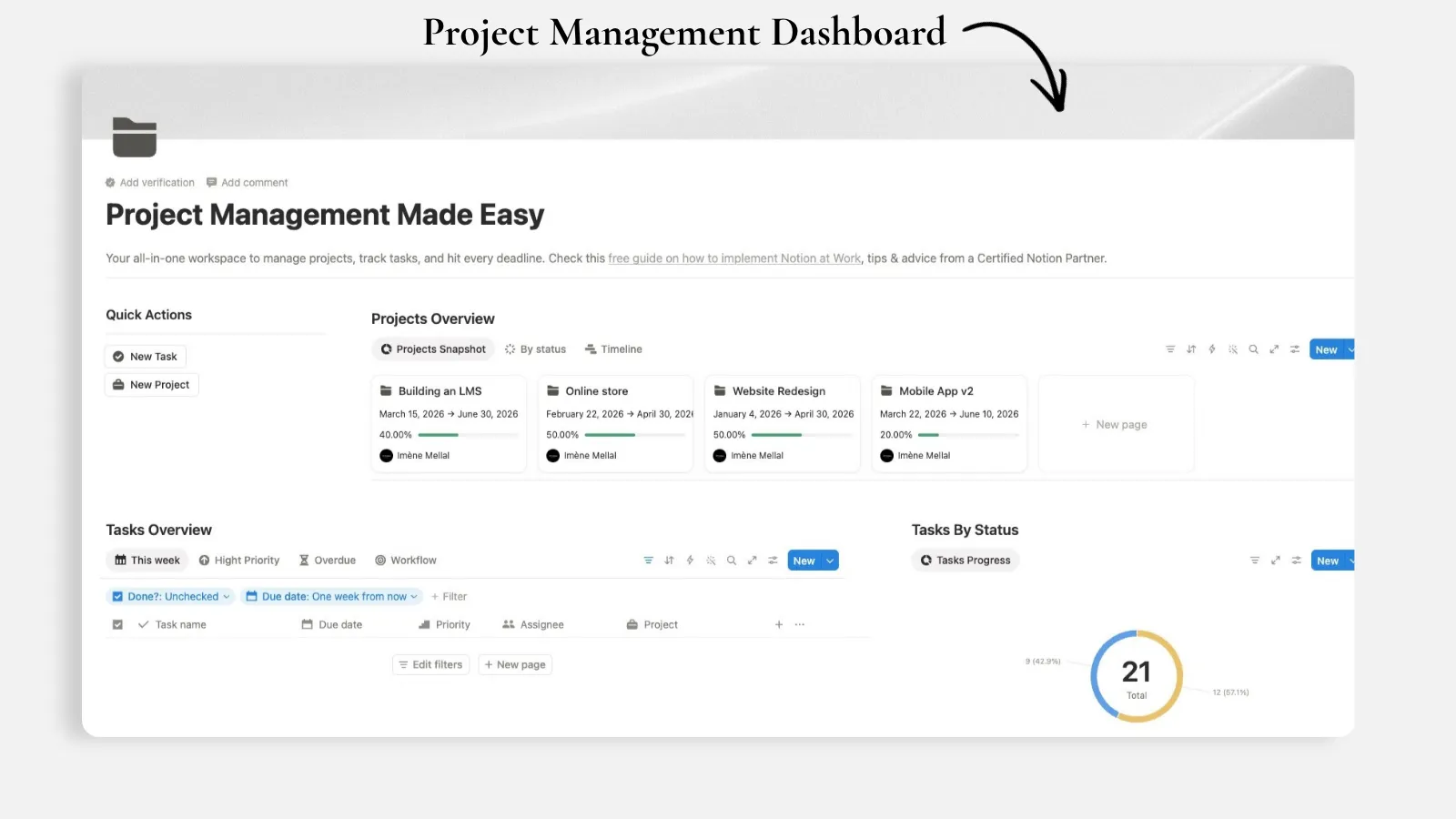
Yes, when the team needs a shared operating system rather than only a task board.
Notion works well for small businesses because the same platform can hold company documentation, a project management system, meeting notes, lightweight CRM records, forms, onboarding, and reporting. The strongest return appears when the team stops maintaining the same information in several apps.
However, adoption matters more than the feature list. A beautiful workspace fails if employees cannot answer three questions quickly:
Where do I start my day?
Where do I add new work?
Where do I find the latest decision?
If the answers require a tour, simplify the workspace before adding AI or automation.
When should you choose an alternative instead?
The right alternative depends on what you want Notion to be.
Your primary need | Better fit to test | Why |
Fast personal tasks and reminders | Google Tasks, Microsoft To Do, Apple Notes | Faster capture and more task-specific behavior |
Spreadsheet modeling and calculations | Excel, Google Sheets | Deeper formulas, analysis, and financial modeling |
Formal sales CRM | HubSpot, Pipedrive, Salesforce | Stronger pipeline, communication, reporting, and sales automation |
Software issue tracking | Linear, Jira | Purpose-built engineering workflows and release management |
Simple team task management | Asana, Trello, ClickUp | More predefined and rigid setup and less workspace design required |
Local-first linked notes | Obsidian | Files stored locally and a stronger personal knowledge graph |
Company wiki with strict documentation workflows | Confluence or a specialist knowledge base | More rigid governance and documentation controls |
This does not mean one of these tools replaces Notion completely. A team may keep Linear for engineering and use Notion for specs, meetings, research, and company knowledge. The goal is not one app at any cost. The goal is one clear source of truth for each type of work.
How can I decide in 30 minutes whether Notion is worth it?
Do not evaluate Notion by browsing templates or feature lists. Test it against one real workflow.
Pick one process you already repeat, such as weekly planning, client onboarding, content production, or project tracking.
Create one database with no more than six useful properties.
Add ten real records, not example data.
Create two views: one for doing the work and one for reviewing it.
Add one database template for the record you create most often.
If another type of record is involved, connect it with one relation.
Use the system for one week without maintaining a parallel version elsewhere.
At the end of the week, ask whether it reduced searching, copying, or remembering.
If it saved time or made decisions clearer, keep it. If the setup demanded more maintenance than the process, simplify once. If it still feels heavy, choose a more focused tool.
Why is Notion still worth it?
Notion is still worth it because it solves a problem most productivity apps separate: the work and the information about the work.
Tasks sit beside the project brief. A client record holds the meetings and deliverables connected to that client. A decision remains attached to the context that produced it. One database can become a personal list, a team board, a client portal, and a management report without copying the data.
The product is also more credible as an all-in-one workspace than it was a few years ago. Basic forms, sites, calendar tools, charts, offline pages, automations, AI meeting notes, search, granular permissions, and agents now cover more of the surrounding workflow. That makes consolidation realistic for many individuals and small teams.
But the final answer is not “yes for everyone.” Notion is worth it when flexibility reduces fragmentation. It is not worth it when flexibility becomes a hobby.
Start with one database, ten real records, and one view you will open tomorrow morning. If that small system helps you do real work, build outward. If it does not, no template with more features will fix the fit.
All content in this article is grounded in real customer interactions and real projects we’ve worked on, the analysis, insights, and ideas are entirely my own. AI tools may have been used to help process raw data, or to reformulate and refine parts of the writing.
Related articles
Frequently asked questions
Is Notion free forever?
Notion has a permanent Free plan at $0 for individuals. It includes basic databases, forms, sites, Notion Calendar, one chart, a limited AI trial, up to 10 external guests, 5 MB file uploads, and 7-day page history. Limits apply when a Free workspace has two or more members.
Is Notion Plus worth $12 per month?
It is worth it when you need unlimited guests, uploads, charts and collaborative blocks, custom forms and sites, longer history, or database automations. If the Free plan is not blocking real work, keep using Free.
Is Notion Business worth $24 per member per month?
It can be for teams that use AI Meeting Notes, Automated AI Agents, enterprise search, granular database permissions, private teamspaces, and longer page history. It is difficult to justify for a solo user who only wants occasional AI writing.
Is Notion AI worth it?
It is worth it when the AI needs context from your workspace, meetings, databases, and connected tools. Meeting transcription, workspace search, research, and property autofill have clearer value than generic text generation. Custom Agents can automate recurring work, but their credit usage should be compared with the time or software cost they replace.
Can Notion work offline now?
Yes. All users can download pages for offline use in the desktop and mobile app. Some preparation and limits remain, including device-specific downloads, a 50-row automatic database limit, and no offline access to live elements such as forms, embeds, or buttons.
Is Notion better than Excel or Google Sheets?
Not for advanced calculations or analysis. Notion is better when records need pages, relations, multiple views, documentation, and collaboration. Excel and Google Sheets remain better for serious spreadsheet modeling.
Is Notion good for project management?
Yes for lightweight to moderately complex project management, especially when projects need connected documents, meeting notes, and knowledge. For advanced resource planning, engineering releases, or rigid enterprise workflows, a specialist tool may be stronger.
Is Notion secure enough for client work?
It can be when permissions are designed carefully. Use guest access for private client pages rather than public links, keep master data internal, and consider Notion Business plan when granular database permissions are necessary. Always test access from a non-admin account before sharing sensitive information.
What is the biggest reason people stop using Notion?
Overbuilding. Too many databases, properties, dashboards, and templates create maintenance instead of clarity. The best Notion workspace is usually smaller than the first version its owner imagines.
Should I migrate everything into Notion?
No. Move active work first and keep specialist tools where they are genuinely better. Test one workflow with real data, then expand only when the benefit is clear.