
Published:
·
updated
9 min read
Here's my exact notion automation setup: map the workflow first, then wire triggers like status changes and form submissions to run the repetitive follow-ups automatically.

A client came to me frustrated that her team kept forgetting the small follow-up steps: a lead comes in, someone is supposed to create a "quote the client" task, and half the time it never happened. She thought she needed to hire another employee. She actually needed a proper notion automation setup. Once we wired the workspace to do those predictable steps on its own, the dropped tasks stopped. Let me walk you through how I approach it.
Start with the workflow, not the automation
The mistake I see most is people jumping straight into building automations before they understand their own process. So the first thing I say is: document the workflow first. Write down the rules, the steps, what should happen and what should not. Automation is only reliable once the process itself is clearly defined and written down. Skipping this is exactly what makes automations fail and fire at the wrong time.
Spend twenty minutes mapping the flow on paper before you touch a single trigger. It feels slow, but it is the difference between an automation you trust and one you have to babysit.
Notion official documentation on Database Automations is here.
How triggers and actions actually work
Every automation is a trigger plus an action. The trigger is the thing that happens, and the action is what the workspace does in response. The two triggers I lean on most are a status change and a new page creation or new form submission (technically, same trigger).
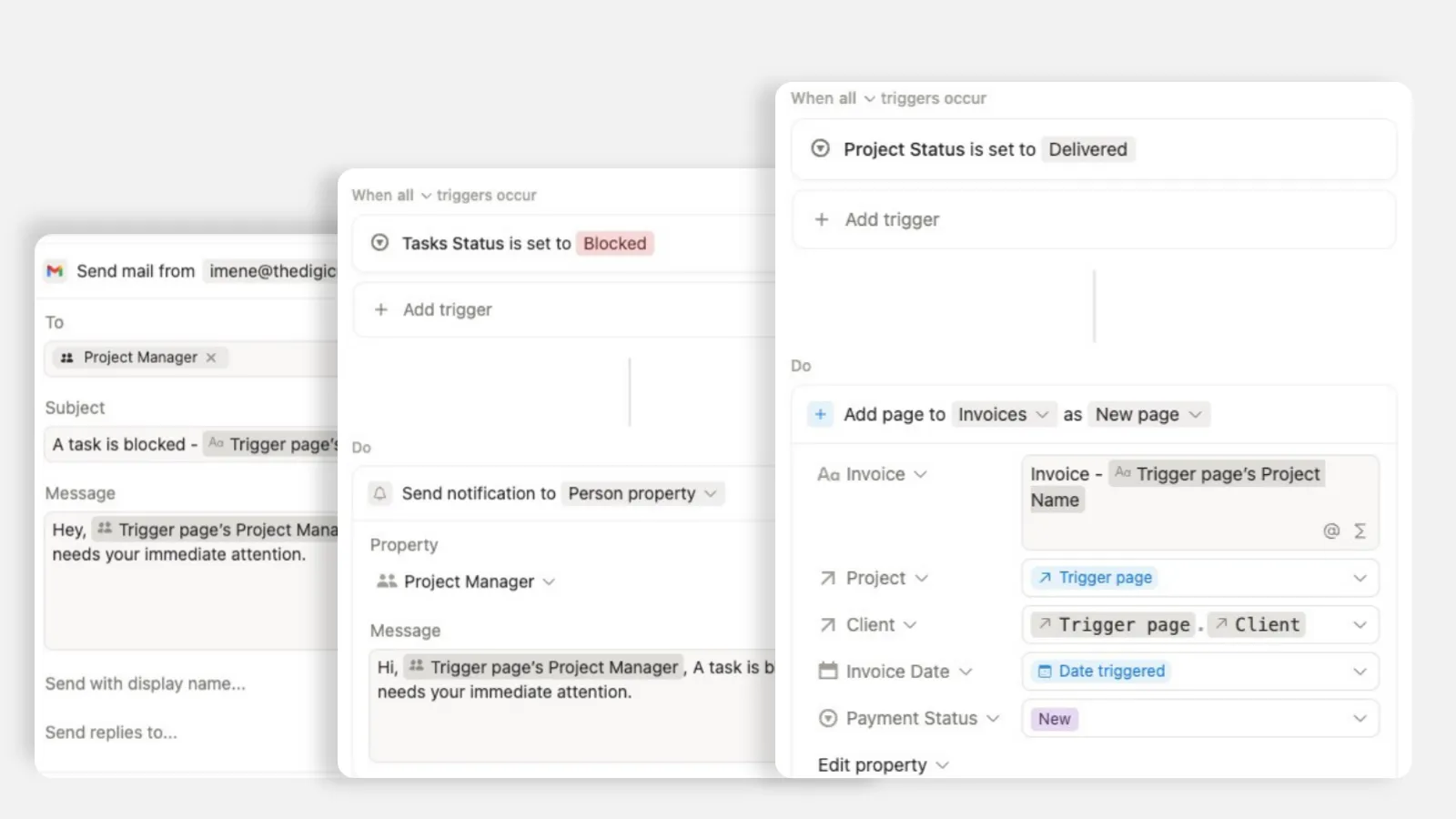
For example, when a task's status changes to "In Progress," or when someone submits a form, you can automatically send an email through a connected Gmail account. Wiring status changes and form submissions to downstream actions is what removes the repetitive follow-up steps from your operations. Nobody has to remember to send the note, because the status change sends it.
Automating the follow-up task, every time
For my frustrated client, the fix was a single automation. For any repetitive step that fires on every new intake, you build an internal automation instead of doing it by hand. We set a trigger of "new page created" in the request tracker, with an action that automatically creates the corresponding follow-up task, the "quote the client" task, in the task tracker.
Note: there is no explicit "form submitted" trigger in Notion Database Automations, this is why we use "New page created" instead, it has same effect because every new form submission is a new page created.
That one rule removed manual task creation for a predictable, recurring step. Every new lead now generates its own follow-up, so nothing depends on someone remembering. This is the pattern I reach for constantly: if a step happens on every single new record, it should not be a human's job.
Reaching across databases correctly
Here is the detail that trips people up when their notion automation setup gets more ambitious. Triggers are limited to the database they are created in, but actions can reach into other databases. So you place the automation in the database that owns the triggering event, and let its action create or update records elsewhere.
A concrete example: if a status changes on a contact in your clients database, put the automation there, and have its action create or update a record in your projects database. Not the other way around. Get this backwards and you will sit there wondering why the trigger never fires. Owning-database for the trigger, any-database for the action.
Making automated emails feel personal
One more layer I add for client-facing teams. You can pair an automation with an agent so a report or update is emailed automatically when a trigger fires, for example when a status changes to "resolved," and use property variables to customize the email content with the client's own details.
And if keeping a personal touch matters, configure the outbound automation to send from your own connected email address rather than a generic system one. Clients then receive updates that look like personal attention instead of an automated blast. Small setting, big difference in how the message lands.
Here is how I would set it up
Map the workflow on paper first. List every step, rule, and exception before building anything.
Pick your triggers. Status changes and form submissions cover most real needs.
Start with one high-value automation, like new intake creating a follow-up task, and confirm it fires correctly.
For cross-database actions, put the automation in the database where the trigger happens and point its action at the other database.
Use property variables to personalize any automated emails so they read like a real message.
Send from your own connected address when the recipient is a client.
The payoff
A good notion automation setup is not about automating everything at once. It is about finding the handful of predictable steps that keep slipping and letting the workspace handle them reliably, every time, without anyone remembering. You get consistency where you used to get dropped balls.
When I finished walking one client through her first automations, she said, "I think the AI autofill and the automations will be a really exciting kind of thing to step into more." That is the right instinct. Start with one trigger that removes one recurring headache, prove to yourself it works, then step into the next. Automations reward you most when they are built on a workflow you actually understand, so do the mapping first and the rest gets easy.
—
This Notion Template includes built-in database automations that help businesses reduce manual hand-off and task follow-up time by +30%: The Automation Agency
All content in this article is grounded in real customer interactions and real projects we’ve worked on, the analysis, insights, and ideas are entirely my own. AI tools may have been used to help process raw data, or to reformulate and refine parts of the writing.
Related articles
Frequently asked questions
What is a Notion automation?
A Notion automation is a rule that performs a repeatable action when something changes in a database. For example, creating a new request can automatically generate a follow-up task, update a status, or notify the right person without manual work.
Which tasks should I automate first in Notion?
Start with high-volume tasks that follow predictable rules: new client intake, task creation, status updates, reminders, and hand-offs between team members. Document the workflow first, then automate the steps that happen the same way every time.
How do triggers and actions work in Notion?
A trigger is the event that starts an automation, such as a new database page or a status change. An action is what Notion does in response, such as creating a related task, editing a property, or sending a notification.
Can Notion automations connect to Gmail or other tools?
Yes. Native Notion automations handle database changes and can connect to tools like Gmail and Slack, while tools such as Make or n8n can connect those changes to other systems. The best setup depends on the workflow and how much control you need.
Do I need a consultant to build a Notion automation system?
Simple automations are approachable once your process is clear. For a multi-team workspace, cross-database workflows, or integrations with external tools, a consultant can help design the system, prevent fragile workarounds, and make the automation scalable and easier to maintain.