
Published:
·
updated
15 min read
My playbook to replace ChatGPT and Claude with Notion AI: same frontier models, reading your live databases, plus meeting transcription and automated follow-ups.

One session, three AI subscriptions cancelled. And the short answer, before the story: Notion AI is not a small writing model. It runs the same reputable models you are already paying for elsewhere, it reads your live databases while it reasons, and on the Business plan it also transcribes your meetings and can send your follow up emails on a trigger. For a solo consultant, that usually replaces three AI subscriptions with one.
Twelve minutes into a thirty minute consultation, the client lifted his hand toward the camera to show me his meeting workflow. He didn't show a dashboard nor a database. He showed me his Apple Watch.
That watch was his recorder. He would hit record on it, place it next to his iPad, conduct his client consultation session, then walk to his laptop, pull the audio, transcribe it, copy the text, paste it into Claude, ask Claude to structure it, move the output into Notion manually, open Google Drive to update a shared project plan, then ask Claude to draft a follow up email into his Gmail drafts, which he would clean up manually before sending.
This is one meeting, nine handoffs repeated weekly for every single client.
This was his workflow and it worked just fine, this is why he never tried to do it differently. What he actually missed was the fact that he was paying for 3 AI subscriptions to produce results that were already sitting inside his Notion Business trial, which he was going to abandon after the trial ends.
By the end of our consultation he had reached a completely different conclusion. In his own words, he said he no longer needed four tools. He needed Notion Business alone, and he would save a lot of money afterwards.
Why do solo consultants end up paying for three AI tools?
My client runs a small business consulting practice. Solo. This means he manages clients, sessions, commitments, deliverables, follow ups all alone. And this is the kind of business operations where the work is the relationship and the admin is the tax you pay to keep it.
For many months, his tool stack looked like this:
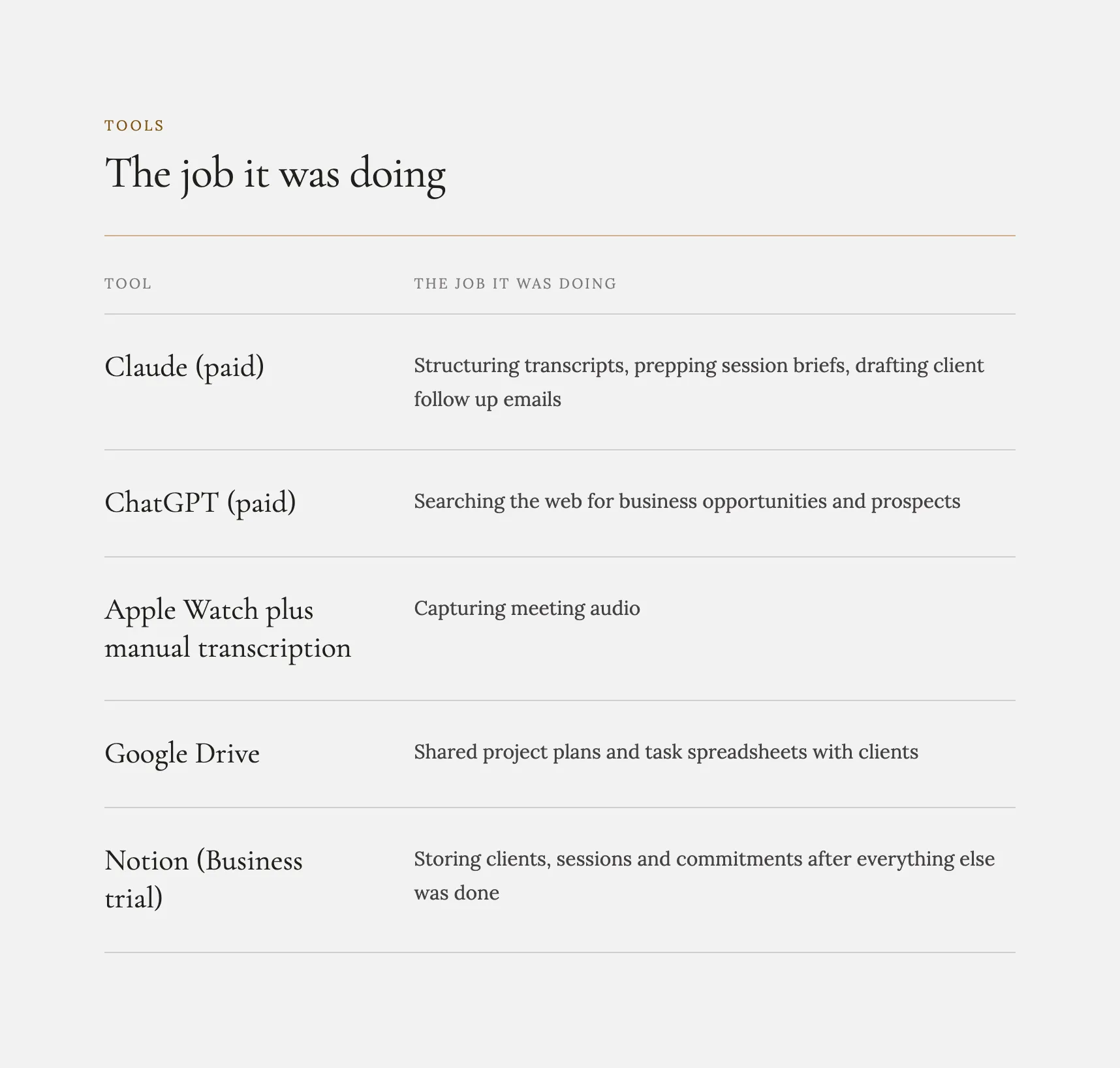
Notice where Notion sits in that list. It was the filing cabinet at the end of the assembly line, not the line itself. Every other tool did the thinking and Notion caught the output as if it were a static Google Doc or a Drive folder.
The client was explicit about why he had reached out. It was not because anything was broken, but because it felt like too many handoffs and connections, and he wanted to know whether any of it could live in one place inside Notion.
Short answer: solo consultants often pay for multiple AI tools because they don't fully understand what their current tools can already do. Instead of getting the right guidance, they keep buying new tools, hoping the next one will magically solve the problem.
Why do people miss features they are already paying for?
When he shared his screen, he opened his Notion workspace and said something that most people would skip. He said he did not really know what all of it was, because when he built it, the AI had generated the teamspaces content and written the pages for him.
In reality, the client had not built a workspace. He had accepted one that was built for him. Every gap in his understanding of Notion had been quietly filled by buying another subscription, because a paid tool that you know how to use always feels safer than a free feature you have never opened.
This is the pattern I see most often in tool sprawl. It is almost never a capability problem. It is a visibility problem disguised as a capability problem.
Can Notion AI replace ChatGPT and Claude?
To answer this question, first we have to break it down into this:
1. Is Notion AI the same model as ChatGPT and Claude?
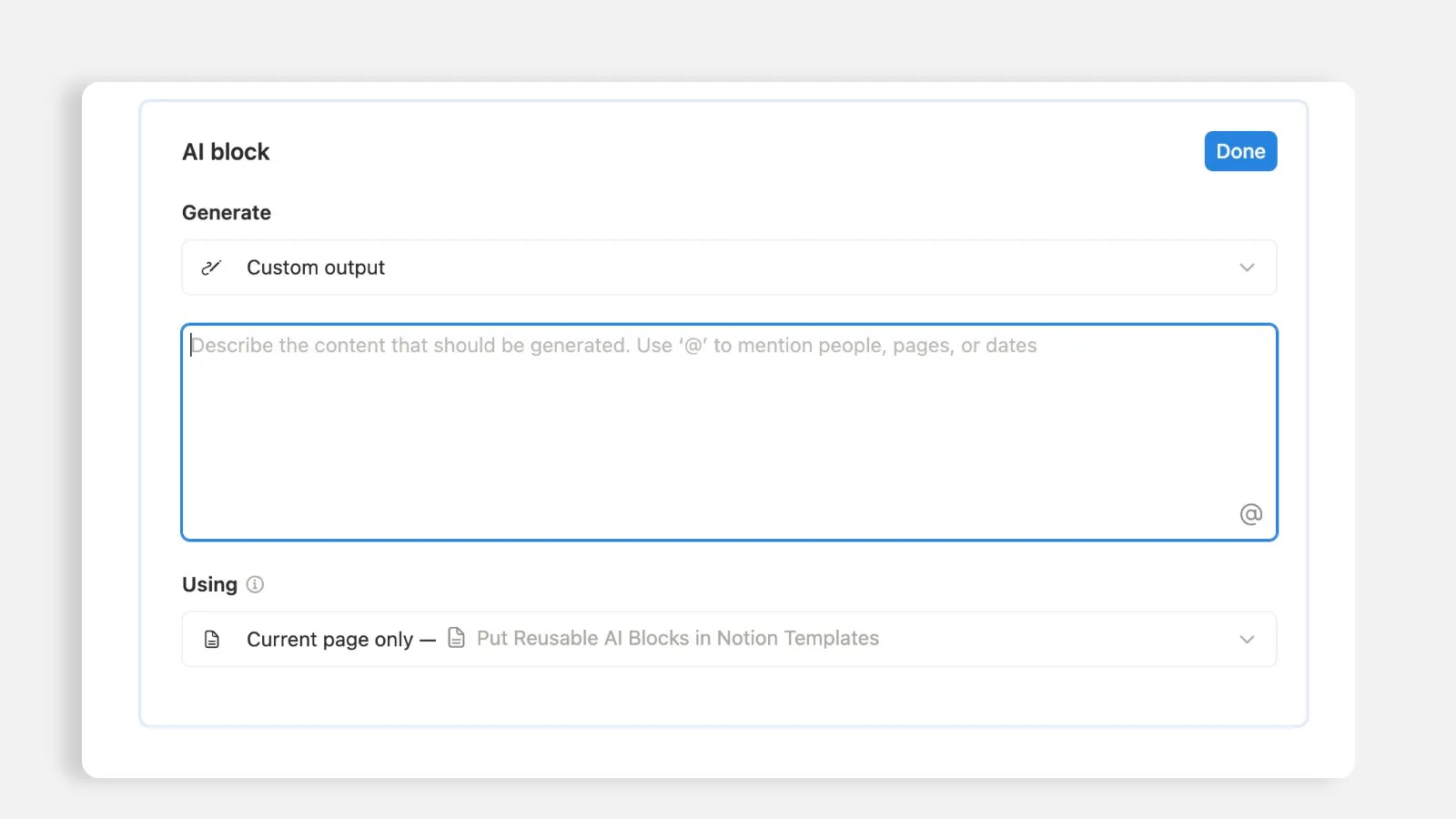
His first assumption, and it is the most common one I hear: that Notion AI is a small, Notion only writing assistant. Something for cleaning up a paragraph or rewriting a sentence, think "Grammarly" type of tool.
This is why I asked him to open the AI window and click the model selector.
He went quiet. The list included the exact frontier models he was paying for separately, month after month, in two different applications. His reaction was immediate, and I quote him: "I assumed Notion had its own limited chat model. These are the same models I am already paying for, and they are inside the plan I have in my trial."
The practical difference is bigger than just the billing. When those models run inside Notion, they are not guessing from a pasted prompt. They are reading his live client database. He had been exporting his own context out of his system so that an external tool could reason about it, then importing the answer back in by hand. I can't even begin to imagine the time it takes to do this manually.
Here is how you would check this for yourself, start to finish:
Open any Notion page and launch the AI assistant.
Click the model selector and read the list properly.
Compare that list against the AI subscriptions on your card this month.
Ask one real question twice: once in your external tool with a pasted prompt, once in Notion with your database in reach.
Keep whichever answer needed less setup from you.
What this means for you: if the model names match, you are paying twice for the same reasoning, and a third time in the copy and paste between them.
2. How do you move your ChatGPT prompts into Notion?
His next question was the most logical one, and it is the question that decides whether a migration is real or theoretical: what happens to my instructions and old AI memory?
He had spent months tuning how his AI should prepare a session brief and how it should format a follow up email. That accumulated instruction set and memory was the actual migration cost. Not the data. It's the historical knowledge.
So we separated two things that people constantly mix up:
A project is a container. Files, context, a place to put the material. In Notion, that is a page, a teamspace, a database.
A skill is a list of instructions. The rules for how a recurring output gets produced. What to include, what to leave out, what format to use, etc.
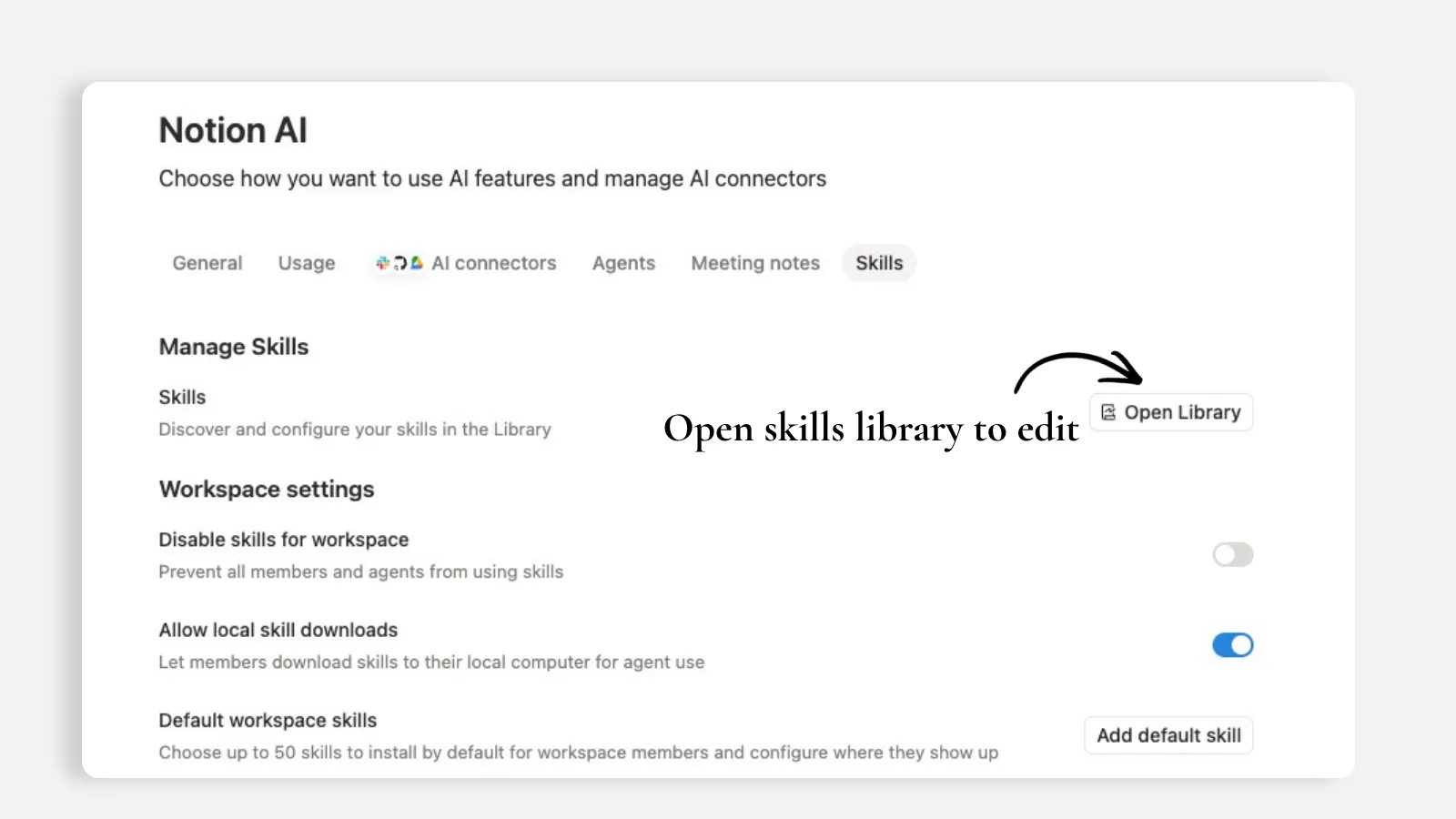
His session brief instructions was a skill. His follow up email format was a skill. Both were easy to transfer somewhere else. You can ask your current tool to export its project instructions and memory as a text or markdown file, you paste that into Notion under workspace settings, you name it, and from then on you call it by name in the AI chat instead of re-explaining yourself every single time you want those rules to apply.
I shared my screen and walked through my own skills library to show him the target state of things. His response when he saw it: "I have been playing with all these tools together, and I could have done the whole thing inside Notion... this is insane."
Here is how I would move your prompts across, start to finish:
In your current AI tool, open the project or custom instructions you lean on most.
Ask it to export those instructions and its memory as a text or markdown file.
In Notion, open workspace settings, choose "AI" and find the "Skills" section, then create a new skill.
Paste the exported instructions in the new skill page, then give the skill a short name you can call in a sentence.
Repeat for every instruction set you have pasted more than twice.
In the AI chat, call the skill by name instead of re-explaining the rules using the symbol "@" before typing the skill title (that's how you mention any page in Notion AI by the way).
What this means for you: the migration cost you are worried about is just a couple of files, not a full rebuild.
3. Can Notion record meetings without a bot?
This was the moment the session turned from interesting to structural.
I opened a blank page, typed a slash command, and inserted AI meeting notes. It began transcribing our call while I kept typing manual notes beside it.
He asked how it was capturing the audio. Through Zoom? Through a bot? And many other clients ask exactly the same thing, because everyone is used to bots joining the calls with them.
The answer is neither. Notion AI Meeting block listens through the device microphone. Nothing joins the call. There is no bot in the participant list, no second device on the desk, no export step. And because it works off the microphone rather than a meeting platform, it works for in person meetings too, from a phone or an iPad on the table. I saw multiple cases where the client was using Notion AI Meeting notes in office meetings, or even to take notes while driving home. I walk through this exact feature, and how it changed my own client calls, in How Notion AI Meeting Notes Changed My Client Calls.
Then the part that actually matters: the transcript does not need to go anywhere. It is already in the workspace, on a page, next to the AI that has access to his client database. Which means the summary, the action items and the task creation all happen without a single copy or paste. Ask the AI on that page to turn the agreed items into tasks, assign deadlines, and link them to the right project, and it does it in the same location where the tasks already live.
This is exactly nine handoffs, replaced by one slash command and one prompt.
Here is how I would set up meeting capture, start to finish:
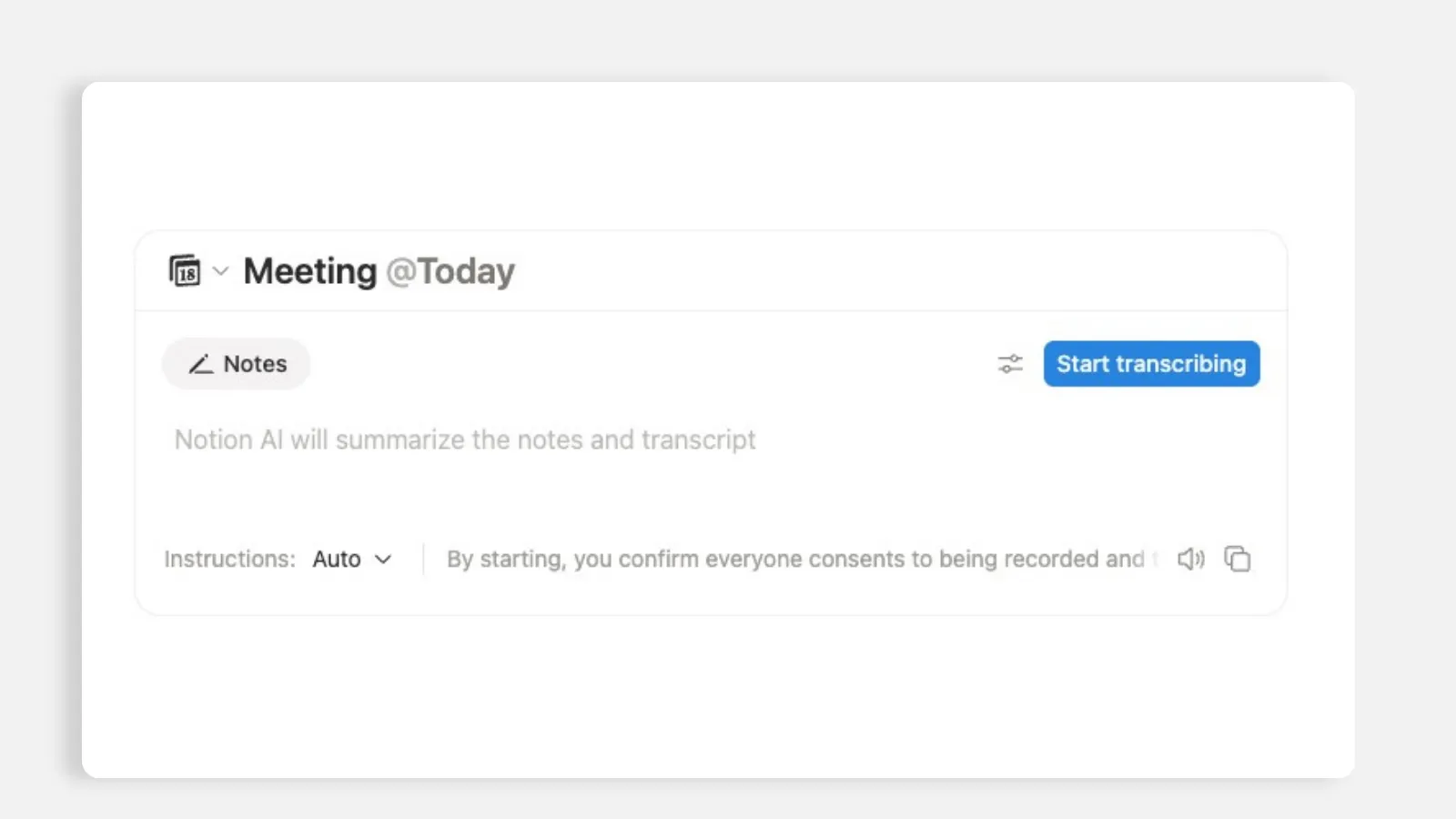
Connect your Google or Outlook calendar under Settings, then Connections.
In Settings, then Notion AI, then Meeting notes, set your default meetings database.
Install the desktop app for calls at your desk, and the mobile app for in person sessions.
Start the transcription before the conversation starts, not once you are already talking (make sure you got the other party's consent, that's on you).
When the call ends, ask the AI on that page to turn the agreed items into tasks with owners and deadlines.
Confirm the tasks landed in your task database, linked to the right client and projects if applicable.
What this means for you: if your capture device is anything other than the app your data lives in, you have added extra work to your to do list, work you don't even have to do.
4. How do you automate client follow up emails in Notion?
I asked him to describe one repetitive workflow in detail, because the specifics are where automation either fits or fails.
He described his post session email. It thanks the client, notes their program status, references how close they are to a specific milestone, lists his deliverables and theirs, and confirms the next meeting date. He drafts it in an external tool, it lands in Gmail drafts, and he edits it before sending.
Every one of those elements is a field he already stores: status, milestone, deliverables, next date. Which means the email is not written, it is assembled.
So we opened Notion database automations on a meetings database. Trigger: meeting marked complete. Action: send an email, with the recipient, the subject and the body built from database variables, including the AI summary of that meeting. Connect Gmail once, build the template once, and the follow up stops being a task on his list and becomes a consequence of updating a status, after checking all other fields (properties) are correct, of course. This is the same trigger-and-action mechanism I break down in Notion Automation Setup: Real Use Case.
I was honest with him about the cost: this one needs real setup time, and the first version will not be the final version. Automations pay off after testing and improvement, the first design is almost never the final one.
Here is how I would build the follow up email, start to finish:
Connect Gmail under Settings, then Connections, once.
Open your meetings database and add a database automation.
Make sure you have a property that has the client email on the meeting database (it's important for step 5 to work).
Set the trigger to a status change, for example meeting marked complete.
Choose the send email action, and pull the recipient email from the email property on the meetings database.
Build the subject and body from database variables: status, milestone, deliverables, next meeting date, and the AI summary of that call.
Run it live on two real meetings (don't send anything to the client while testing), edit the template once, then leave it alone.
What this means for you: if every element of an email already exists as a field, the email is assembly work, and assembly work belongs to a trigger and action automation. It's not meant to be done manually.
The line I was actually listening for
Somewhere around the twenty minute mark, before talking about the automations, he said something important.
He said he had been rushing to build his hubs while the trial was still running, and had been debating whether it was even worth digging deeper into Notion (that's normal when you don't know the value of the tool, and Notion is pretty good at making you work to earn it).
That is the churn confession. He was a customer three days from a cancelled trial, and the reason has nothing to do with the product being weak. He had not found the features. He had found another duplicate of Google Drive or desktop folders, priced it against exactly that, and logically concluded it was not worth it.
By the end of the call the full picture changed. He listed the tools he had been paying for and concluded he did not need most of them, because the capability he was buying elsewhere was included in the plan he was already ignoring, for 3 months. He said Notion was far more powerful than he had thought.
What we did not solve, and I will not pretend otherwise
Two things stayed open, and both are worth naming because they are the honest edge of a consolidation story:
The connected notebook tool. He asked whether Notion connects directly to the research notebook he uses with Gemini, I checked the integrations live, and told him there is no direct connection. His stack went from four tools to two, not to one. That is still the right outcome.
Client facing collaboration. He keeps project plans in Google Sheets because he is not sure whether clients without Notion accounts can view and update work. We ran out of clock before I could address it properly, and it is the single most consequential question he asked, because it is the reason the last external dependency survives. That question has a good answer. It is called a client portal, and it deserves its own session rather than a rushed four minutes. I cover exactly that build in Notion Client Portal: Full Guide & How To Build It.
The pattern, for anyone reading this with a similar stack
Three things I would take out of this call if it were mine.
Tool sprawl is a map of what you did not know. Every subscription is a record of a moment when someone hit a wall and bought their way around it instead of opening a settings page or investing some time in real tutorials. Read your own stack that way and the redundancies become obvious.
Count handoffs, not tools. Four tools with one clean pass between them is a healthy system. Two tools with nine copy and paste steps is an unhealthy system. The metric that predicts whether a workflow survives a busy week is the number of times a human has to move data by hand.
Anything you instruct twice is not a prompt. It is a list of instructions that should be saved as a skill, next to the data it operates on. The moment you are re-pasting the same paragraph of rules into a chat window, you have found an automation, you just have not built it yet.
Run the audit on yourself
Let me give you the recipe now: five questions in fifteen minutes and no consultant required:
List every AI subscription you pay for and write the single job each one actually does.
For each job, ask whether it is a capability question or a settings question. Most are settings questions.
Pick your most repeated workflow and count the handoffs, where a handoff is any copy, paste, export, upload or device switch.
Open the plan comparison for the tool you already pay for and read it properly before buying the next one.
Find every instruction you have pasted more than twice and save it where your data lives.
If that audit turns up more overlap than you expected, that is not a sign you made bad decisions. It is a sign you made fast ones, under pressure, without a map, and that's completely okay. Everyone does. The fix is one focused conversation and the right decision to be taken. Nothing more.
If your stack looks like this one, the fastest thing you can do is not add a tool. It is to open the one you already pay for and find out what you have been renting twice.
All content in this article is grounded in real customer interactions and real projects we've worked on, the analysis, insights, and ideas are entirely my own. AI tools may have been used to help process raw data, or to reformulate and refine parts of the writing.
Frequently asked questions
Is Notion AI the same model as ChatGPT or Claude?
Notion AI is a model picker rather than a single in-house model. Open the AI panel, click the model selector, and you will see frontier models listed there. The difference is not the model, it is the context: inside Notion those models can read your live databases instead of a pasted excerpt.
Can Notion AI replace my ChatGPT and Claude subscriptions?
For most consulting workflows, yes. Drafting, structuring transcripts, prepping briefs, and formatting follow ups all run inside Notion on the same class of models. The honest exception is anything that depends on a specific external product, like a research notebook tied to another vendor, which has no direct Notion connection.
What happens to my custom prompts if I switch?
They move. Ask your current tool to export its project instructions and memory as a text or markdown file, paste that into a Notion skill in workspace settings, name it, and call it by name in chat. Your accumulated instructions are the real switching cost, and they are portable.
Do I need the Business plan for Notion AI meeting notes?
AI transcription sits on the Business tier, not the mid tier. Price it against the notetaker and AI subscriptions you would cancel, not against zero, because the net number is usually the one that decides it.
Does a bot join my calls when Notion transcribes?
No. Notion listens through the device microphone, so nothing appears in the participant list and no recording leaves your workspace. Because it works off the microphone rather than a meeting platform, it also captures in person meetings from a phone or tablet.
Can Notion send client follow up emails automatically?
Yes, with a database automation. Trigger on a status change such as meeting marked complete, then send an email built from database variables and the AI summary of that meeting. Connect Gmail once and the follow up becomes a consequence of updating a status.
Will Notion connect to every AI tool I already use?
No, and you should check before you plan around it. Some tools have no direct connection, so a four tool stack may collapse to two rather than one. Check both the Notion integrations list and the other vendor's integrations page, because connectors often exist on one side only.
Is Notion worth it if my clients do not have Notion accounts?
This is the question that keeps most external spreadsheets alive. Clients without accounts can be given access to a scoped, client facing space, which is why the answer is a client portal rather than a shared sheet.